How to Export Your Cap Table Data from Pulley Before It Shuts Down
Pulley’s service is scheduled to end on December 8, 2026. Pulley says customers will have limited access to their data through January 31, 2027, but the safest migration plan is to export, preserve, and reconcile your records while the full application is still available. 2
This guide shows the current Pulley export path, what the resulting workbook can and cannot prove, which supporting records to archive, and how to prepare a reviewable file for another cap-table system. It is a technical records-preservation guide, not legal, tax, accounting, or securities advice. Have your company’s counsel and finance advisers resolve any disagreement about legal effect, ownership, approvals, or tax treatment.
- Open Pulley’s cap table. Sign in, choose Cap Table in the left navigation, and select Download Cap Table.
- Export the all-time workbook. Keep All time selected for the primary archive, decide whether a separate draft-inclusive copy is useful, and download the XLSX.
- Use Reports if the direct control is unavailable. Open Company, choose Reports, and generate the Detailed Cap Table report.
- Preserve supporting records. Archive the executed agreements, approvals, valuations, grant records, and other documents behind the spreadsheet rows.
- Convert and reconcile a copy. Keep the original unchanged, review every mapped and unmapped field, then import only after the new table agrees with the source records.
1. Export the latest full cap table from Pulley
Step 1: Open the cap table
Sign in to your Pulley account and choose Cap Table in the left-hand navigation. In the cap-table view, select Download Cap Table. Pulley’s Help Center documents other entry points, but this is the clearest path for a current export. 1
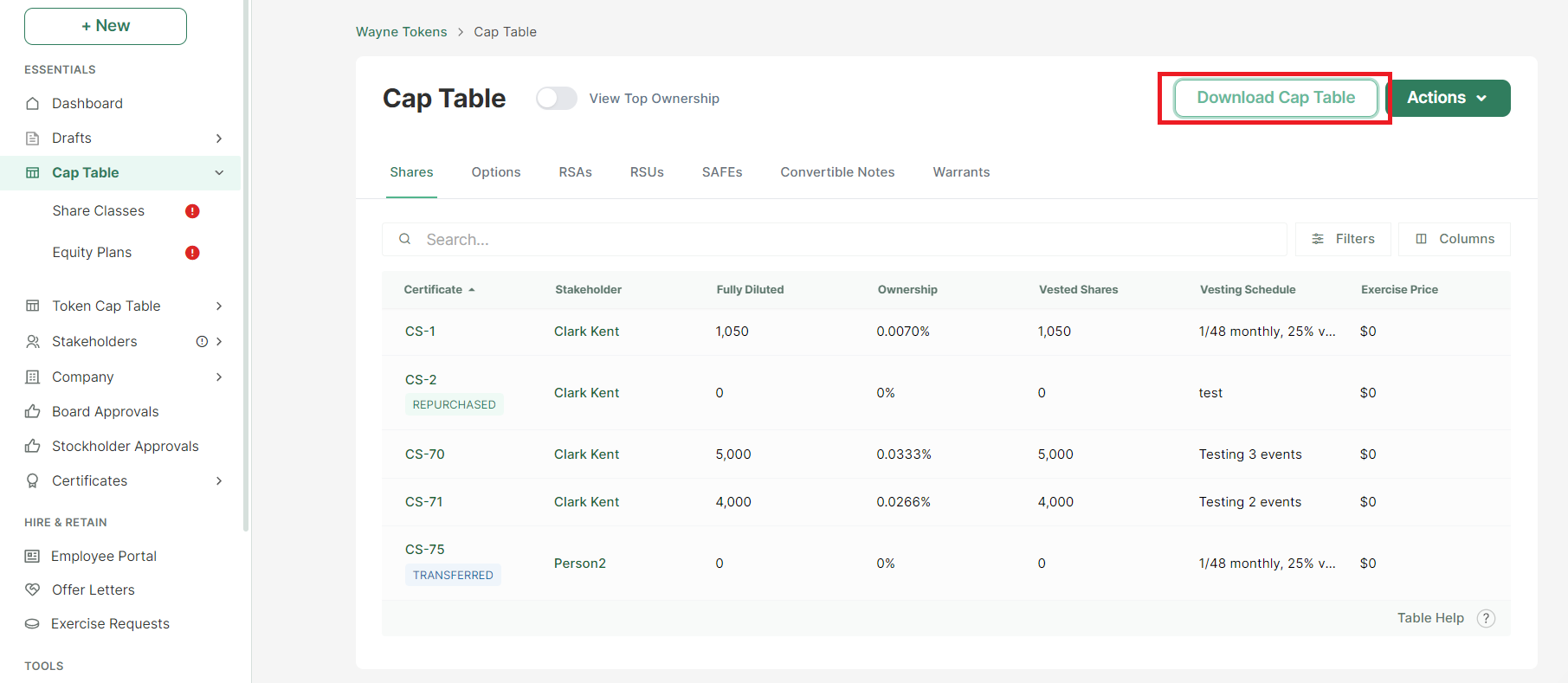
Screenshot: Pulley Help Center. Official Pulley interface image; labels and layout may change. See Pulley’s export instructions.
Step 2: Keep “All time” for the migration archive
The download dialog defaults to All time. Leave it selected when creating your primary archive. An all-time export is the better starting point for a migration because it is intended to represent the complete cap-table history available in the account, rather than an as-of snapshot.
Pulley also lets you clear All time, enter an End Date, and download a historical view. Use an end-date export when you need to reconcile a financing close, board package, or prior ownership snapshot. Do not use it as a replacement for the current full export: later issuances, exercises, cancellations, transfers, or other activity may not appear in an older snapshot. 1
Step 3: Decide whether to include drafts
Include Drafts is optional. For the primary archive, export the normal current table first, then decide whether a second export with drafts is useful for your internal review. Draft transactions are not necessarily approved, signed, funded, effective, or legally operative. Label any draft-inclusive file clearly, keep it separate from the authoritative working copy, and ask counsel or finance how unresolved items should be treated.
Select Download and save the file as an .xlsx workbook. Use a descriptive, immutable filename such as company-pulley-cap-table-all-time-2026-09-22.xlsx; substitute the actual export date. Do not overwrite the original when you create cleaned, converted, or imported versions.
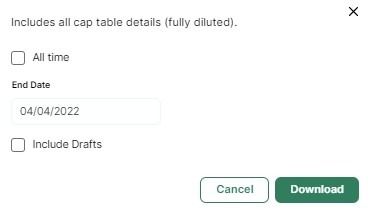
Screenshot: Pulley Help Center. The dialog illustrates the date-range and draft controls. See Pulley’s official export article.
Step 4: Use the reports fallback if needed
If Download Cap Table is not visible in your account, Pulley documents a fallback route: open Company → Reports, find Detailed Cap Table, and select Generate Report. The report is described as a capitalization summary with the company’s security ledgers and is exported in Excel format. 1
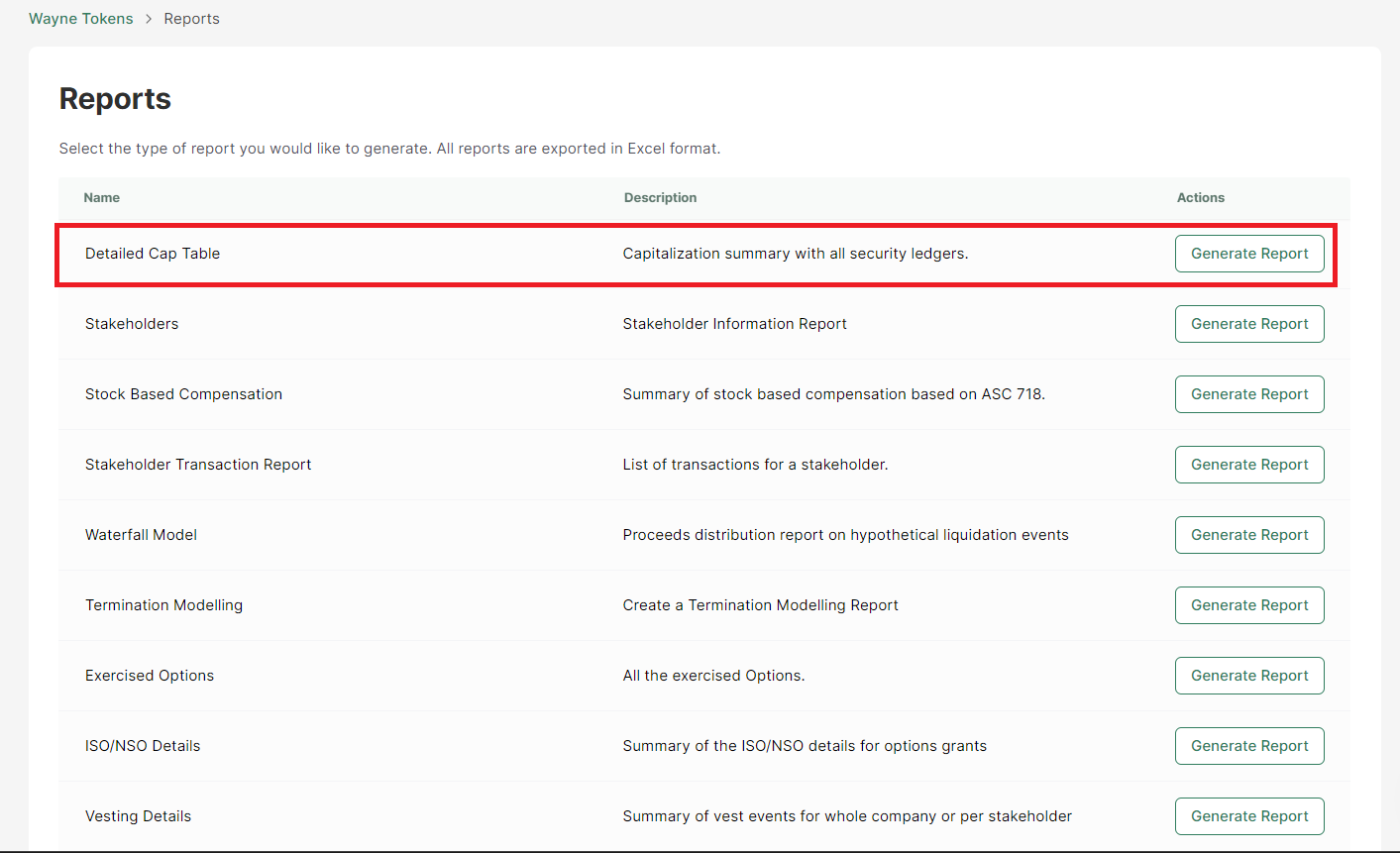
Screenshot: Pulley Help Center. Official Pulley interface image showing the Detailed Cap Table report path. See Pulley’s export instructions.
After either route, open the workbook and confirm that it is readable. Record the export date, account or company name, selected date range, whether drafts were included, and the workbook’s worksheet names. Keep a second copy in a controlled company drive with restricted access. The export contains sensitive personal and financial information, so apply the same access controls you use for equity and payroll records.
2. Understand what the XLSX does, and does not, contain
Pulley’s current Cap Table Basics documentation says the exported report includes an Ownership tab and data visible in the ownership table, including stakeholder information, share classes, equity incentive plans, awards issued outside plans, and issued-and-outstanding or fully diluted ownership information where shown in the interface. 5 Pulley also provides contract-specific views such as Shares, SAFEs, RSAs, RSUs, and Convertible Notes.
That makes the workbook a valuable structured record. It is not automatically a document archive. A spreadsheet row can show that a security, grant, or stakeholder record exists without containing the executed agreement, signature history, board consent, side letter, valuation report, tax form, or attachment that supports it. A workbook is therefore evidence to reconcile, not proof that every signed document is preserved.
Create a separate archive folder and preserve the source documents that explain each material record. At minimum, look for the following:
| Record category | Preserve and reconcile |
|---|---|
| SAFEs and convertible notes | Executed instrument, side letters, investor identity, funding amount, valuation cap, discount, MFN or pro-rata terms where applicable, maturity or interest terms for notes, conversion or amendment records, and evidence of funding. A SAFE and a convertible note are not interchangeable: the SEC describes a SAFE as a contract for a future equity interest, while a convertible note is generally a debt obligation with repayment, interest, and conversion features. 4 |
| Options and ESOP records | Equity plan or ESOP document, plan reserve, grant agreements, grant dates, vesting schedules and cliffs, strike prices, exercises, early exercises, cancellations, expirations, repurchases, terminations, and any amendments. Match option records to the plan under which they were issued. |
| Stakeholder data | Legal name, entity or individual type, email and other contact details used for notices, tax or residency fields where maintained, beneficial-owner or nominee information, and duplicate or historical names. Record how identity was verified rather than silently merging similar names. |
| Shares and other securities | Share class, certificate or ledger identifier, issue date, number of shares or units, transfers, repurchases, splits, cancellations, and current status. Preserve the terms for preferred stock, warrants, RSAs, RSUs, and any other instrument in the account. |
| Approvals and corporate records | Board and stockholder consents, financing approvals, option-plan approvals, issuance or repurchase approvals, and closing checklists. Keep executed versions with their dates and signers. |
| Valuation and financial records | Each 409A or other FMV report relied upon, effective date, valuation-provider deliverables, cap-table inputs, and the link between a valuation and grants made at that time. The IRS distinguishes statutory and nonstatutory options and explains that tax treatment can depend on fair-market-value facts, so do not discard the underlying valuation files when moving the table. 3 |
Also archive transaction-level material that may not be obvious from an ownership summary: grant, exercise, cancellation, termination, transfer, repurchase, reclassification, stock split, conversion, and amendment records. If an employee or investor received a notice or signed an agreement outside Pulley, include that file even if the spreadsheet appears complete.
3. Pay special attention to SAFEs, notes, and option pools
SAFEs and convertible notes are not just “investments”
Exported fields such as investment amount, valuation cap, discount, round, and issue date are useful for structuring a migration. They are not enough to determine the legal or economic result of a financing. The executed SAFE or note controls its terms, including conversion triggers, treatment on a sale or dissolution, amendments, side letters, and any rights that affect the next round.
Use the workbook to build an inventory, then open each source document and compare the terms. Flag missing signatures, mismatched investor names, a funding amount that differs from the agreement, duplicate instruments, converted instruments still shown as outstanding, and instruments whose status is unclear. Ask counsel to resolve the meaning of any discrepancy rather than changing the table merely to make totals agree.
Option and ESOP records need both a ledger and a plan context
An option count without its plan, grant date, strike price, vesting terms, and status is incomplete for operational review. Compare the total reserved pool with issued, exercised, cancelled, expired, and remaining shares. Check that terminated grants are not treated as active simply because a row remains in an export. Check exercises against payment and issuance records, and check cancellations or repurchases against the corresponding approvals.
The IRS notes that stock-option tax treatment can depend on whether an option has a readily determinable fair market value and on what happens at exercise or disposition. 3 That is one reason to preserve the 409A/FMV report and grant documentation together with the ledger. This guide does not determine tax treatment; it identifies the records your advisers may need.
4. Reconcile before you import or rely on the new system
A migration is complete only after someone has reviewed the result against the source of truth. Use this sequence:
- Freeze and hash the source files. Keep the original Pulley XLSX, any CSV or report exports, and the supporting-document archive unchanged. Record filenames, dates, and who downloaded them.
- Inventory the structure. List worksheets, row counts, headers, date range, draft setting, share classes, plans, security types, and any unmapped or blank fields. Preserve the raw values before normalizing names or dates.
- Reconcile stakeholders. Compare the names and identifiers in the export with signed documents and the company’s finance or legal records. Investigate duplicates, former names, entities, nominee arrangements, and missing contact information.
- Reconcile securities and transactions. For each class and instrument, compare issued, outstanding, exercised, cancelled, converted, and reserved amounts. Trace grants, exercises, cancellations, transfers, repurchases, and conversions to a dated source document or approval.
- Reconcile control totals. Compare total shares by class, fully diluted totals, option-pool reserve, ownership percentages, financing amounts, and the treatment of outstanding SAFEs or notes. A new platform may display terminology or calculations differently, so document the definition behind each total.
- Review exceptions with advisers. Create an exception log with the source row, supporting document, discrepancy, proposed treatment, reviewer, and resolution date. Do not treat a converter, import screen, or spreadsheet formula as legal validation.
For a historical snapshot, repeat the comparison using the matching End Date. An as-of report can be useful for proving what the table looked like at a financing close, but it should be labeled as a snapshot and kept alongside the all-time archive.
5. Prepare a file for Lovie, if that is your chosen destination
Lovie’s public converter documentation lists cap-table imports in CSV, PDF, and XLSX. Its import flow extracts records and presents them for review before anything is saved to the live table. 6 That review step matters when the source contains draft transactions, multiple worksheets, inconsistent headers, or instruments whose legal status requires human judgment.
If you want a normalized CSV, the Pulley converter reads a selected CSV or XLSX in the browser and creates a downloadable CSV on your device. Its public documentation says it accepts files up to 20 MB, reads the first worksheet of an XLSX, and maps common fields such as stakeholder name, stakeholder and instrument type, share class, shares, fully diluted shares, investment amount, valuation cap, discount, round, issue date, vesting, title, and email. 6 Non-empty values from unrecognized columns are preserved in a Source Notes field, while the results show mapped and unmapped headers for review.
The converter does not upload your file to Lovie, connect to your Pulley account, or verify grants, SAFEs, notes, approvals, signatures, or legal effect. It also does not promise universal compatibility with every Pulley export or destination schema. Review the converted CSV against the untouched XLSX and your document archive before importing it.
When you are ready, open Lovie CapTable or read the Pulley alternative and migration guide to compare workflows. You can also visit the Lovie company homepage for the broader company context. If you are deciding among providers, the Pulley vs. Carta vs. Lovie comparison can help frame the operational questions. No automatic migration, partnership, zero-data-loss guarantee, or legal validation is implied by using these resources. Timing depends on file complexity, the quality of the source records, and the review your team and advisers need to complete.
A practical handoff checklist
Before you close the Pulley account or rely on a replacement system, confirm that you have:
- An untouched all-time XLSX export and, if useful, a clearly labeled draft-inclusive export.
- One or more dated snapshots for financing, board, or audit reconciliation where needed.
- Stakeholder, share-class, plan, security, and fully diluted ownership data.
- Executed SAFEs, convertible notes, warrants, stock agreements, option grants, amendments, and side letters.
- Grant, exercise, cancellation, termination, transfer, repurchase, reclassification, conversion, and stock-split records.
- Board and stockholder approvals tied to issuances, plans, financings, and repurchases.
- 409A/FMV reports and other valuation or financial records your advisers rely on.
- A reconciliation log that records unresolved exceptions and who must resolve them.
- A reviewed import or replacement-system table, plus a preserved copy of the original source archive.
Pulley says it cannot assist migrations to a different provider, so preserving the source artifacts yourself is especially important if you choose a destination other than Carta. 2 Start with the export, keep the evidence behind every material row, and make the final system earn trust through reconciliation rather than assumption.
References
- 1 — Pulley Help Center: Download an Excel of the cap table
- 2 — Pulley: FAQ on the Pulley shutdown
- 3 — Internal Revenue Service: Topic no. 427, Stock options
- 4 — U.S. Securities and Exchange Commission: Investor Bulletin on SAFEs
- 5 — Pulley Help Center: Cap Table Basics
- 6 — Lovie: Free Pulley CSV and XLSX converter
Reviewed by the Lovie CapTable Editorial Team on September 22, 2026. Pulley’s interface, availability, and shutdown notices can change; verify the linked primary sources before acting.